Plug it in. See if it works.

RobotDx shows what is plugged into your computer, motor controllers, CAN adapters, cameras, the computer itself, and whether each one is working. Live, in plain words.

Early and in development. It runs on BAM's own robot rack and there is nothing to download yet. Built by BAM Robotics.

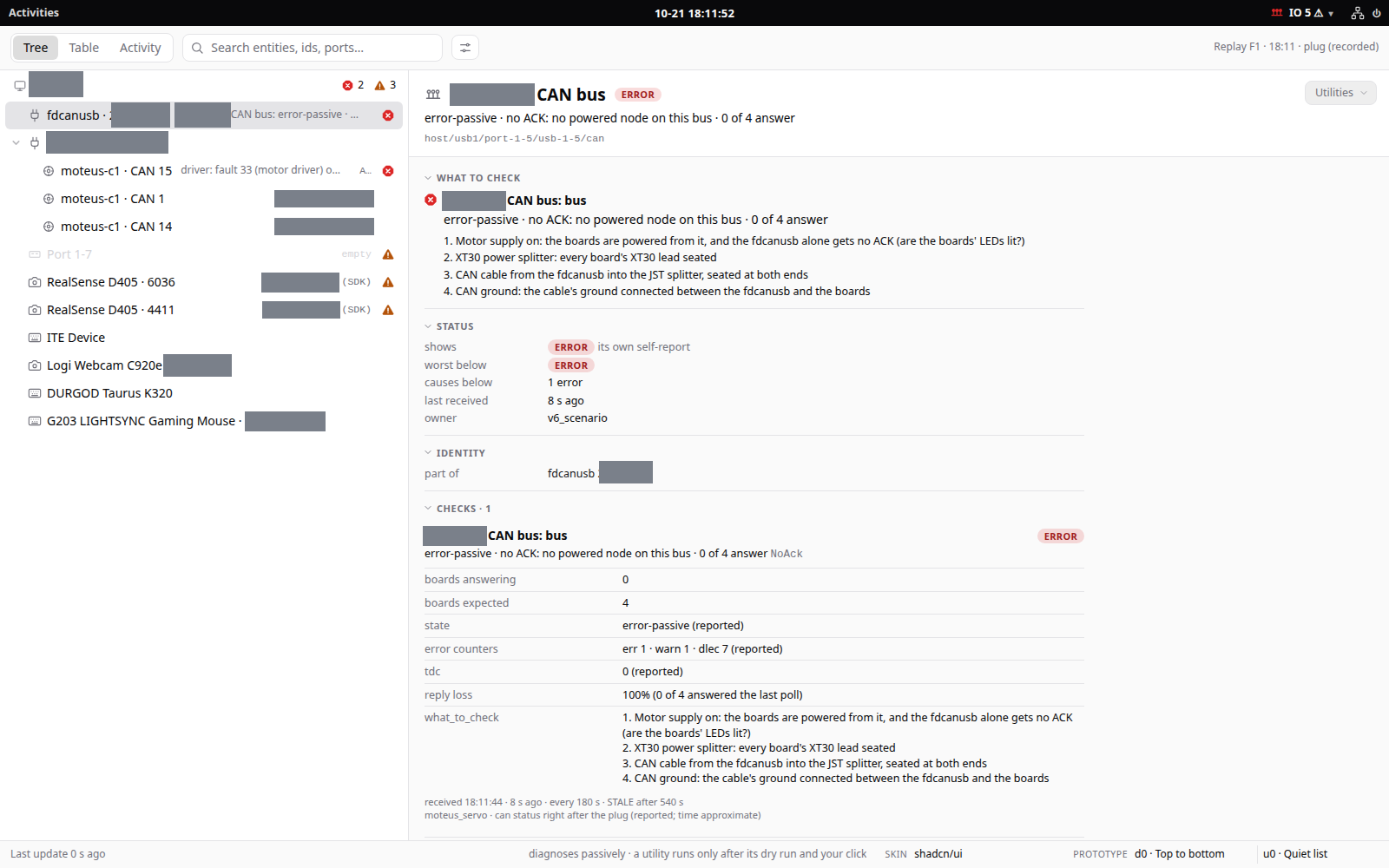
The RobotDx window: a tree of plugged-in devices on the left, with one adapter in error, and on the right a plain-words list of what to check.
The real app, replaying a recorded moment from the rack (the "Replay" label top right is the app's own). The adapter is plugged in but no powered board answers on its CAN bus, so it says ERROR and lists four things to check, in order. Healthy rows say nothing.

Seven things it holds to

This is a placeholder page, so it is mostly the thinking. These come from my own notes and from the code. The quotes are mine, spelling and all. Each one is traced to a decision, with the options that were considered, on the decisions page.

1. Plug it in and it runs

It sounds like a basic thing: plug the part in, see what it is, see if it works, and when it doesn't, see what to check first. That is the whole job. Everything else on this page is in service of it.

“I plug it in and now I need it to run”

Zach Yamaoka, notes, 22 Oct 2026

“I can just quickly see the stuff that is plugged in and if its working or not”

Zach Yamaoka, notes, 22 Oct 2026
2

The driver knows itself

Each driver is a black box, and it says what its own failure means. RobotDx hosts that report and never overrides it. A group of parts can report something different from its parts: a spider with eight legs can say "warning" when one leg says "failure". To add a device, a driver ships one program and one small config file.

“In black-box design it's up to each lower-level black box to self-report what it means in the context of THAT black box.”

Zach Yamaoka, 22 Oct 2026

“The plugins are doing all of the heavy lifting this is basically a light UI shell that reads the information”

Zach Yamaoka, notes, 22 Oct 2026
3

Stock parts first

The record is ROS's DiagnosticStatus, kept whole, with a few fields added on top (where it is, two clocks, identity). Strip the extras and any stock viewer reads it. That has been tried in Lichtblick and in ROS 2 Humble. A simple check can be a plain Monitoring Plugins (Nagios) command: exit code 0, 1, 2 or 3, and one line of text.

“I always like that design, it makes it backwards compatible.”

Zach Yamaoka, 22 Oct 2026

“we follow the same footsteps”

Zach Yamaoka, notes, 22 Oct 2026
4

A command first, a button second

Every driver is a program you can run from a terminal, and every utility is a command line. The window is a view of that, so a person, a script and an AI all use the same thing. A utility shows a dry run first: the exact command it would run and what it checked, with nothing run. Only a person presses the real button, and each one is marked by what it does:

  • query reads only
  • interrupts stops or resets
  • changes writes stored state
  • moves makes hardware move

“CLI can be used by AI or anything”

Zach Yamaoka, notes, 23 Oct 2026

“now you need to deal with like permissions”

Zach Yamaoka, notes, 22 Oct 2026
5

Say only what you know

If a check stops reporting, it goes stale; it does not keep its last good answer. Unknown is unknown and never looks fine. One missing board is one problem, not one for the board and another for the rack, and a dead adapter explains the silent boards behind it. And you can say what should be there, so the page can read "6 of 7 boards" and name the one that is missing.

“the information can go stale etc if its not updated”

Zach Yamaoka, notes, 22 Oct 2026

“we need to be able to like easily configure expected number of things”

Zach Yamaoka, 23 Oct 2026
6

Quiet until something is wrong

Grey for normal. A healthy row shows nothing, with no green dots. Colour is for a real warning or error, and a warning or error also gets a shape, so it does not rely on colour alone. A busy button or a danger label never borrows that colour.

“quiet by default and only call out on the things with errors”

Zach Yamaoka, notes, 23 Oct 2026

“all the green actually is distracting”

Zach Yamaoka, notes, 22 Oct 2026
7

The same check, at the bench and on site

A diagnostic is a test of an interface. Run it once to accept a part on the bench, then keep it running in deployment to see the part still meets it. One check, written once, with one place for the truth. That is where this is heading; today the file that says what the rack should have is the first piece of it.

“you can do them during deployment for monitoring”

Zach Yamaoka, notes

“have one ground truth of success and health”

Zach Yamaoka, notes

What exists today

It is early. This is what runs on BAM's robot rack now.

A tree of what is plugged in

Computer, USB port, hub, device. Also PCIe, network, serial and video devices. It reads the operating system, so it works before any driver is involved.

Drivers that bring their own checks

Moteus motor controllers and their CAN adapters, RealSense D405 cameras, and the computer itself: CPU, memory, disks, temperatures, GPU and USB bandwidth.

A top-bar tray and a full window

The tray chip is the glance. The window is the tree, a table, an activity log and the utilities, in a plain "bare metal" skin or a prettier one.

Utilities that dry run first

Check communication, check firmware, run calibration, and the rest, with the same names on every driver.

The dry run

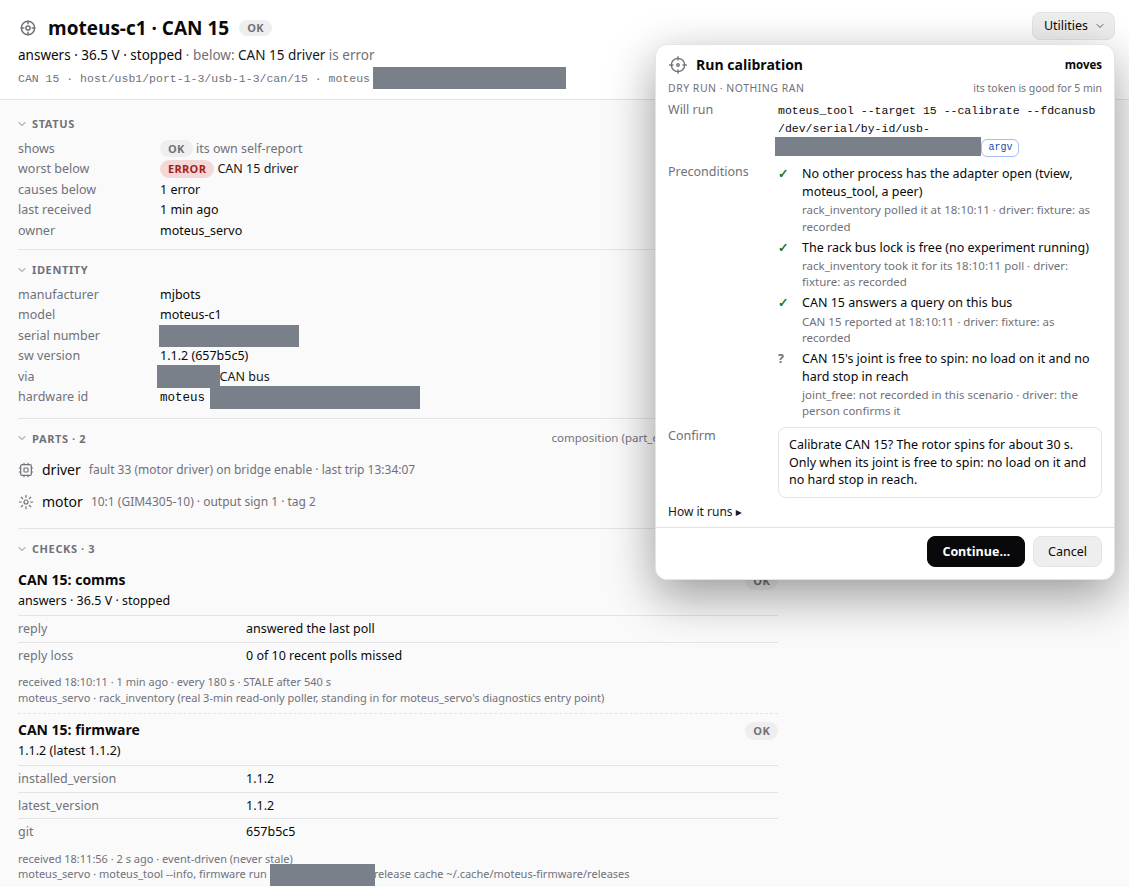
This is a calibration that spins a motor. The sheet says what it would run, ticks off what it checked, and asks one question you have to answer. It has run nothing yet.

The Run calibration sheet in RobotDx: DRY RUN, NOTHING RAN, the command it would run, four preconditions, and a confirmation question.
The app, on a recorded scenario. The tag top right of the sheet, moves, is the danger class.

A driver is a program that answers three verbs

That is the whole plugin contract. RobotDx runs the program, reads JSON lines from it, and never imports the driver, so the driver keeps its own dependencies, its own language and its own crashes.

# what it is, and the utilities it registers
<command> describe
# one run of checks for one device
<command> diagnose --device <id>
# a utility; a dry run prints the exact command it would run
<command> act --device <id> --action <name> --dry-run

The smallest example, a made-up gripper, answers diagnose with lines like this (one of them, without its timestamp, and wrapped to fit):

{"schema": "diagnostics-record/0", "record": "status",
 "path": "jaw", "name": "jaw: temperature",
 "level": "warn", "code": "JawHot",
 "message": "jaw motor 71 °C (warn above 70 °C)",
 "expected_period_s": 30,
 "measurements": [{"key": "temperature", "value": 71.0,
                   "unit": "Cel", "warn_high": 70.0}]}
Planned

The Python package is not published, and this import does not work yet:

# planned: not available yet
from robotdx import RobotDiagnostics

There is no download, no public code and no sign-up while it is this early. When that changes, it will be on this page.

The name

RobotDx used to be called RobotDiagnostics, and before that IO diagnostics. That is a long word to write and a hard one to sell. In medicine, Dx is shorthand for diagnosis, so RobotDx says the same thing in less. In code you would still write RobotDiagnostics. To open the app, you search robotdx.

The face is calm, in the spirit of a health robot.

“baymax is a health robot”

Zach Yamaoka, notes, 23 Oct 2026

The logo here is a placeholder while the final one is drawn.